Playbox Samples Not Working In Kontakt 8 [SOLVED]
![Playbox Samples Not Working In Kontakt 8 [SOLVED]](https://cdn.synaps.media/shunslab/content/images/size/w960/2026/01/Screenshot-28.png)
⚡️ TL;DR
If Playbox lo-fi samples/FX are silent when using Kontakt 8 as a plug-in (but work in standalone), the issue is tied to the default output routing in the new UI. Switching to Classic View and manually adjusting the output settings resolves the sync/audio bug.
Step-by-Step Solution
- Open Kontakt 8 as a plug-in in your DAW (MPC, Maschine, Ableton, etc.).
- Switch to Classic View: Toggle away from the default modern UI to access the traditional Kontakt interface.
- Open the Output Page: Locate the Output section/button (typically found in the bottom right or via the Workspace management icon at the top).
- Change Output Configuration: Locate the setting labeled "default stereo 28x (plugin)" and change it to a different output assignment.
- Test: Your lo-fi samples and background textures should now play back as intended.
We’re going to talk about a small problem I had yesterday with one of the products by Native Instruments. It's called Kontakt, and within Kontakt is a program called Playbox.
The issue I was having was how Kontakt 8 was working in the standalone mode versus how it wasn't working as a plug-in.
When you load Kontakt 8 in standalone mode, and load up Playbox, you can go into the FX tab and embed a sample with your sounds. It can be a vinyl record, it can be animal noises, kids playing, whatever samples that the lo-fi portion provides you... or you can provide your own sample. Now when you go into standalone mode and play your sounds and have something locked in for the lo-fi portion, you should hear it playing in the background.
My issue was if I loaded Kontakt 8 as a plug-in within the MPC software, Maschine 2, or in Ableton, that same functionality wouldn't work. The sample itself, whatever you generated within Playbox, would play as normal, but for some reason that lo-fi section would not play. I tried many variations, looking through settings, compared and contrast them from stand-alone mode to the plug-in. Everything looked alright, but I couldn't figure out the problem.
Then I loaded up Kontakt 7 and realized this problem was exclusive to Kontakt 8 because in Kontakt 7, it worked as intended, even as a plug-in. So I was confused. Then I went onto one of the NI forum sites to ask because at this point I was frustrated. Some time went by, I might have closed the computer down and taken a break to diffuse. And later something just said, “Hey, try it again.”
I booted up Kontakt 8 one more time as a plug-in again for my MPC and started tinkering inside what they call the classic and default view. The default view will basically give you an updated UI of Kontakt, but in classic view it gives you that classic view, and for some reason you have access to an output page that isn't present in the updated UI. It's in the bottom right corner of the window, and when you go there you have the option to change more settings.
Once inside I changed the output settings away from "default stereo 28x (plugin)," then it started playing, and that pretty much solved the issue.
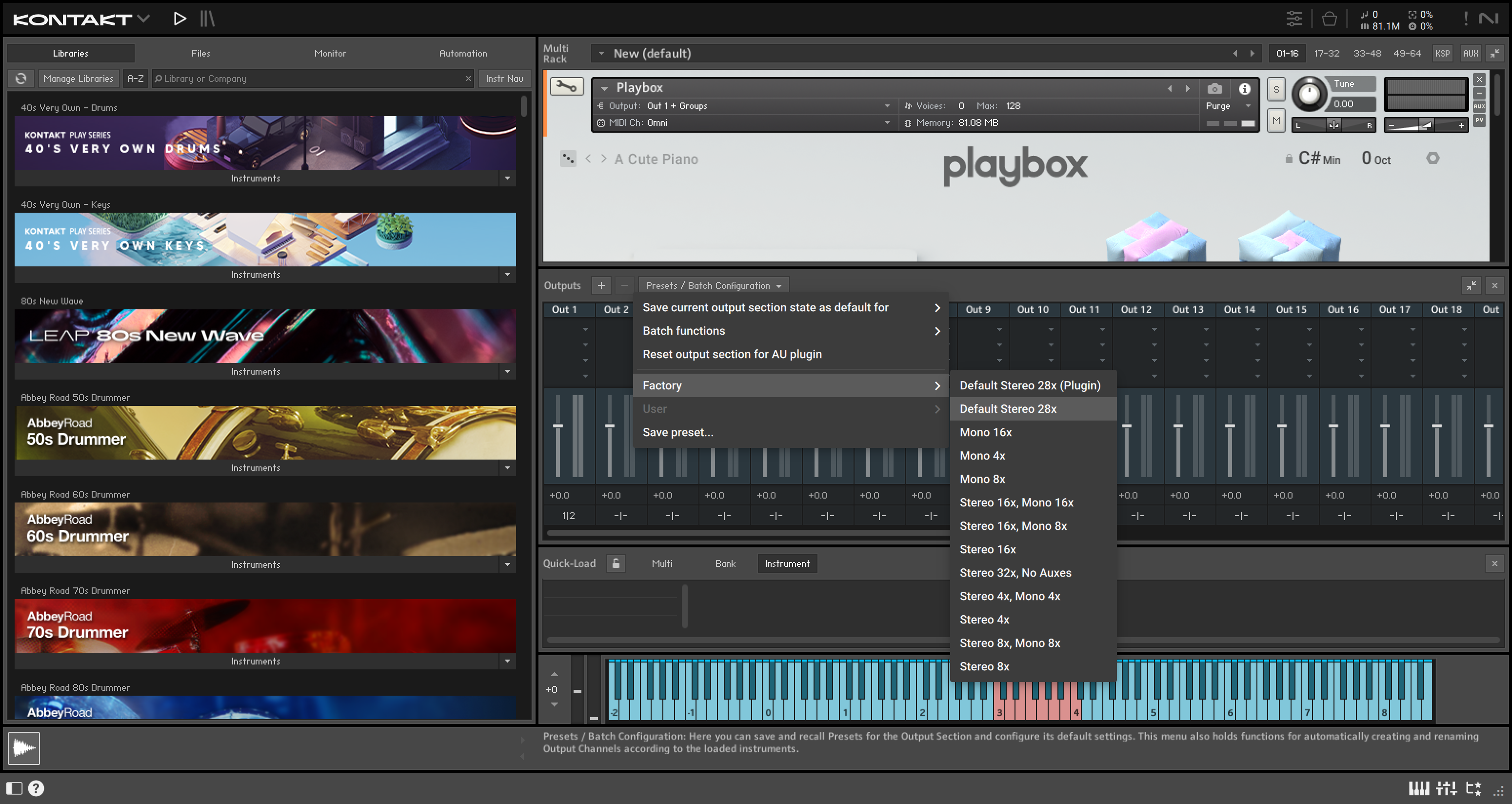
Now why it solved the issue? I can't answer that question, but I do know it worked.
⚡️ You can support this work via a secure ABLE gift page. Visit ugiftable.com and enter code J99-H38 to contribute.